Accountsd Mac cpu is high

accountsd process is eating 500% cpu and making macbook pro 15,1 useless after Catalina 10.15.7 update.

Even if you force this process to quit it comes back at ~500% CPU and make lots os apps to hang.


I have tried to disable iCloud Mail integration and other suggestions related to "accountsd" that fixed this issue in previous Catalina versions but nothing worked.


Any suggestions?


[Re-Titled by Moderator]

MacBook Pro with Touch Bar

Posted on Sep 25, 2020 7:48 AM

Reply
Question marked as Top-ranking reply

Posted on Oct 1, 2020 3:41 AM

OK, so this worked for me.


  1. Go to "~/Library/Accounts"
  2. Rename Accounts4.sqlite to Accounts4.sqlite.backup


CPU immediately went back to normal. Didn't need to logout out of Apple ID, or restart. Just that file rename did it. Thread here - https://www.reddit.com/r/mac/comments/j05c8e/user_reports_show_that_macos_10157_clogs_up_the/

307 replies

Sep 26, 2020 2:13 AM in response to alessiobulfaro

Sorry, try this:


https://support.apple.com/kb/DL2052?locale=es_ES


(If it doesn't work, Use the link that "cavemees" posted some replies before...I used that: Download macOS Catalina 10.15.7 Combo Update)


I tried the logout of the accounts and other stuff..but the only thing that solved it was that update (and I wasn't very confident because I thought that it was the same update that I installed early that afternoon...but it worked)


Regards


Sep 26, 2020 4:32 AM in response to fpmalard2017

Just got this issue on my new macbook pro 16" (bought it yesterday). accountsd clogs up the whole CPU and makes computer basically unusable. My first point of contact at apple - The dispatcher army - said this is usual as I have a new macbook. I followed this statement by saying I am an engineer and nothing is usual about this problem. After being transferred to the I presume tier 2 support. They tried to validate the issue by running the computer in the safe mode. But as accountsd is a system task, problem continued. They are now making me reinstall macOS Catalina.


Will follow up.

Sep 26, 2020 7:22 AM in response to fpmalard2017

So I finally figured out the issue.


Mail is sending some data to iCloud. If you notice with your Documents and Desktop folders, Catalina makes it so saving to iCloud is a default. The same goes for Mail settings.


  1. Settings>Apple ID>iCloud Drive (Options>
  2. Uncheck Desktop and Documents folders.
  3. Uncheck Mail


Not only is Mail working as it should, accountsd is using substantially less CPU %.


Anyway, this is what worked for me for now.


Sep 26, 2020 6:29 PM in response to fpmalard2017

Lamento mucho no hablar ingles, la solución que traigo es para los que no usen la aplicación de MAIL.


Para entrar en ~ / Library en el Finder entrar a la barra de menús en la parte superior, buscar el menú “Ir”  y sostener la tecla “alt” luego entrar en ”Biblioteca”.


  1. Ir a ~ /  Library y borrar la carpeta Mail
  2. Ir a ~ /  Library / Containers / y borrar com.apple.mail
  3. Reiniciar el Mac
  4. Listo.


Este procedimiento no afecta en nada el funcionamiento del mac, pero no sé que pueda pasarle a los usuarios que utilicen la aplicación de MAIL.


Espero haber sido de ayuda y dar una solución provisional hasta que Apple lo solucione de manera permanente. Gracias.


Sep 26, 2020 11:17 PM in response to fpmalard2017

Hello all,


I ran into the same issue as all of you.


I found an easier way than reinstall the update via the combo or some of the other manipulations that I have seen.


There is a tool that I've been using for years, and that I actually always recommend and use after an update or even a major upgrade.


It's called ONYX. It helps perform some maintenance tasks such as clearing caches, rebuilding indexes, etc. The only "catch" is that you have to download the proper version of ONYX, depending on your version of MacOS. In this case, we are all having the issue with Catalina so that's a no brainer:

https://www.titanium-software.fr/en/index.html


As I had hoped, after running it and the reboot, everything came back into place. The issue is clearly due to some cache or whatever not being cleaned/reset after the 10.15.7 update.


EDIT: before running it, to help MacOS be a little more at ease CPU-wise, I did follow what some of you did by killing the "Commerce" process, accountsd went from 300% CPU usage to 50%, which is still too high; but at least it gave some CPU time for ONYX --> the scripts and maintenances it launches do require quite a bit of CPU available. Under normal circumstances, the "cleaning" can take up to 10 minutes, so don't freak out.


Here are the settings I used on my side: (in french, but you'll get the english version with the link I provided)

(I don't know if those are default settings or not nowadays, ONYX remembers your past choices and I have been using it since 2008; and since 2013 on this Macbook Air)
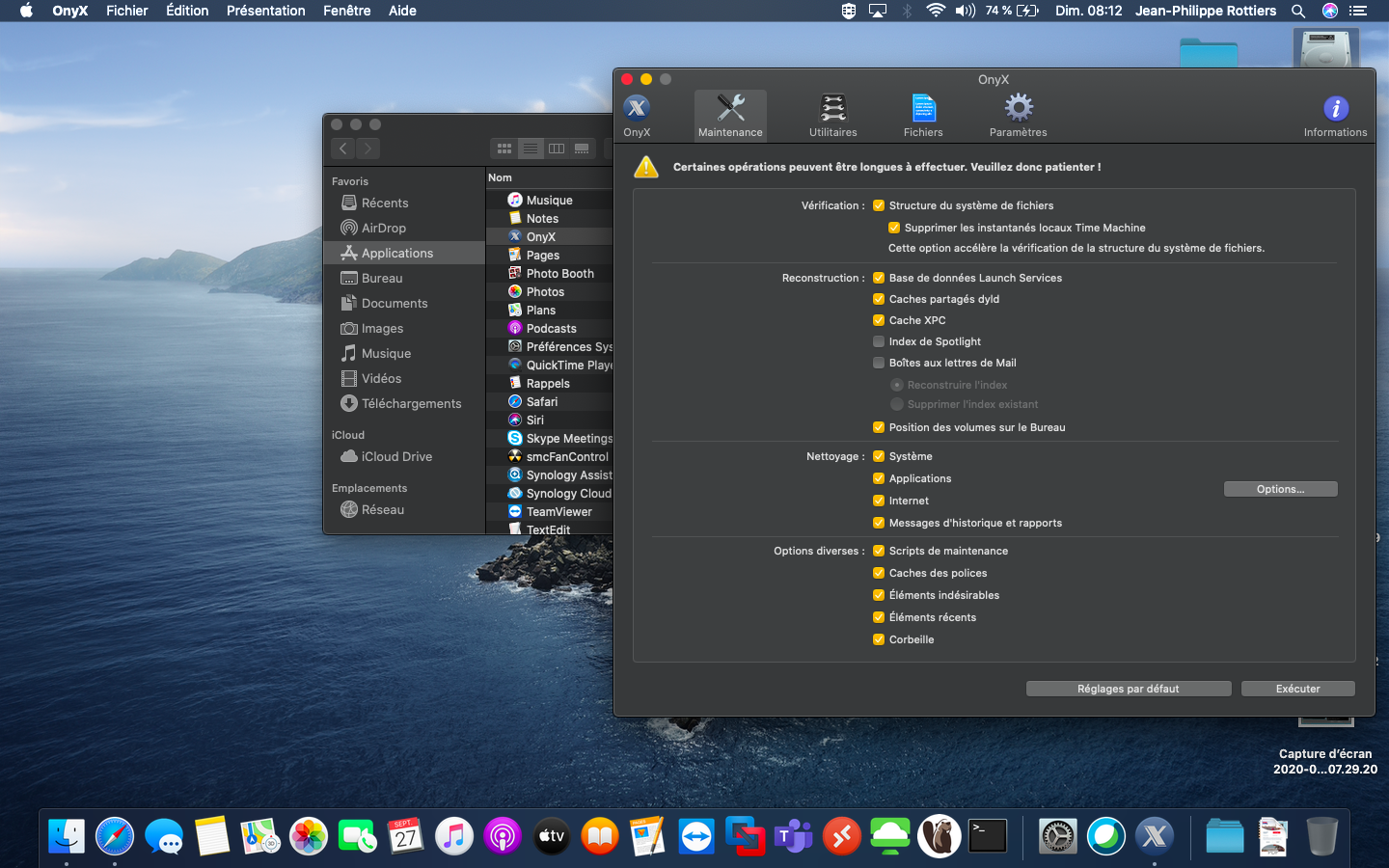
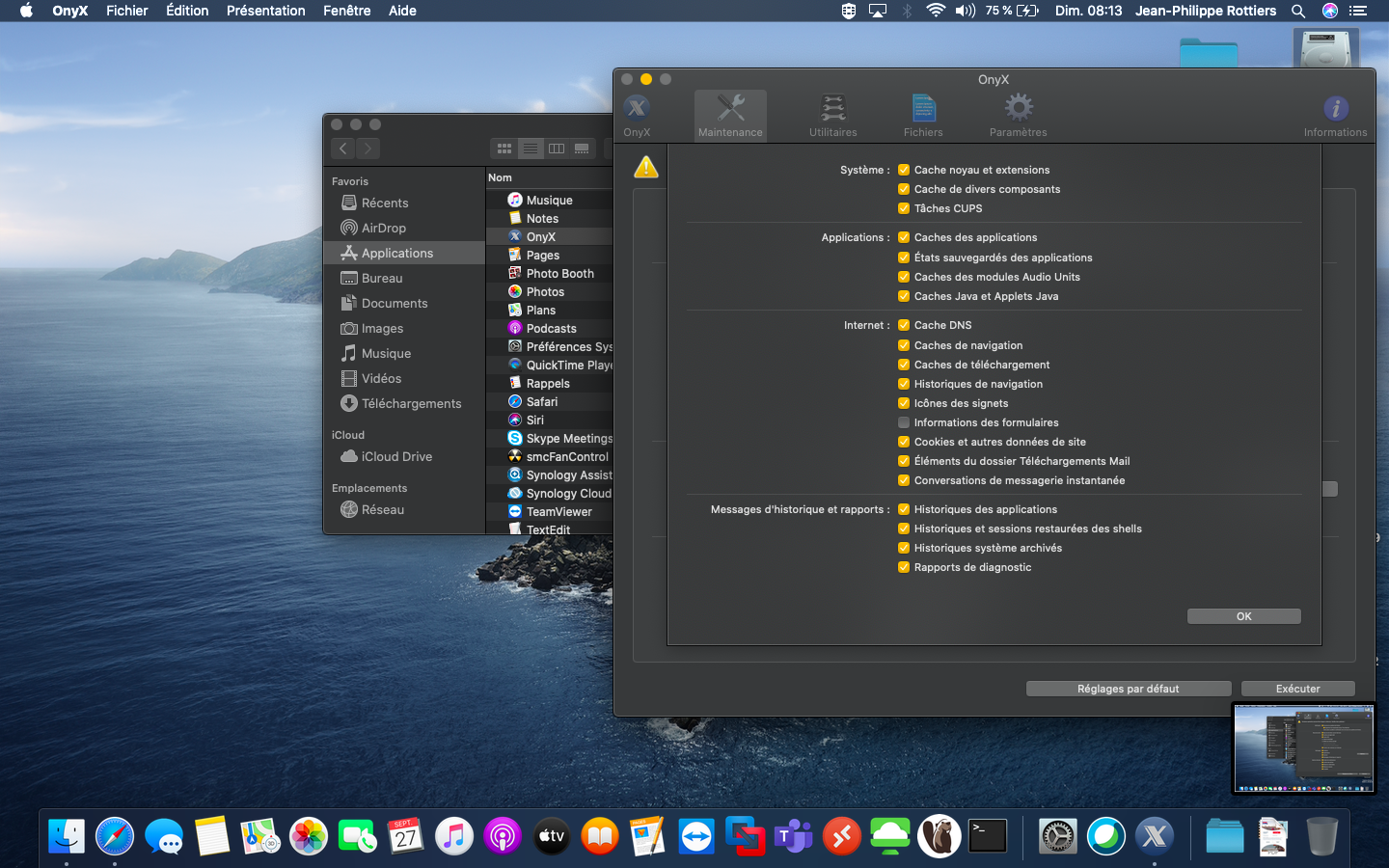


It seems like the smoother way to fix our issue.


That being said, *** Apple?


Have a great day,


Jean-Philippe.

Sep 27, 2020 7:19 AM in response to fpmalard2017

Just had the same problem after updating my 2019 MacBook Pro to MacOS Catalina 10.15.7. I contacted support by chat and in the end the only solution was to re-install MacOS (see below) it was a success. My laptop is back to normal 😊


To reinstall the MacOS (and keep your files) :

1) power off the MacBook.

2) Then start it back up and press and hold the Command-R keys together till you get the Apple icon.

3) Once in MacOS Recovery select Reinstall MacOS.

This thread has been closed by the system or the community team. You may vote for any posts you find helpful, or search the Community for additional answers.

Accountsd Mac cpu is high

Welcome to Apple Support Community
A forum where Apple customers help each other with their products. Get started with your Apple Account.
