Cellular service disabled after iOS 15.3.1 update

Has anyone had problems with cellular service being disabled with the 15.3.1 update? 2 of my co-workers have had this problem right after the update was completed.


[Re-Titled by Moderator]

iPhone 13 Pro

Posted on Feb 15, 2022 8:13 AM

Reply
Question marked as Top-ranking reply
42 replies

Feb 15, 2022 8:15 AM in response to Jnwsmom

Carrier Update (Required): Released by your Cellular Service provider (Carrier Update), affects your Outgoing / Incoming calls, SMS, Data etc..
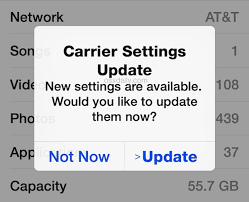


How to Update Carrier Settings

You can manually check for and install a carrier settings, update with these steps: Make sure your device is connected to a Wi-Fi or cellular network. Tap Settings > General > About. If an update is available, you'll see an option to update your carrier settings.

Update your carrier settings on your iPhone or iPad - Apple Support



Few Carrier (Cellular Service Provider) does not provide Carrier Settings in full but they offer APN settings for example

  • Google FI which has APN to be entered manually as h2g2
  • MTN Ghana which provides APN pin to be updated manually as the internet
  • BSNL in India which provides APN pin to be updated manually as bsnlnet (Watch teh GIF below)
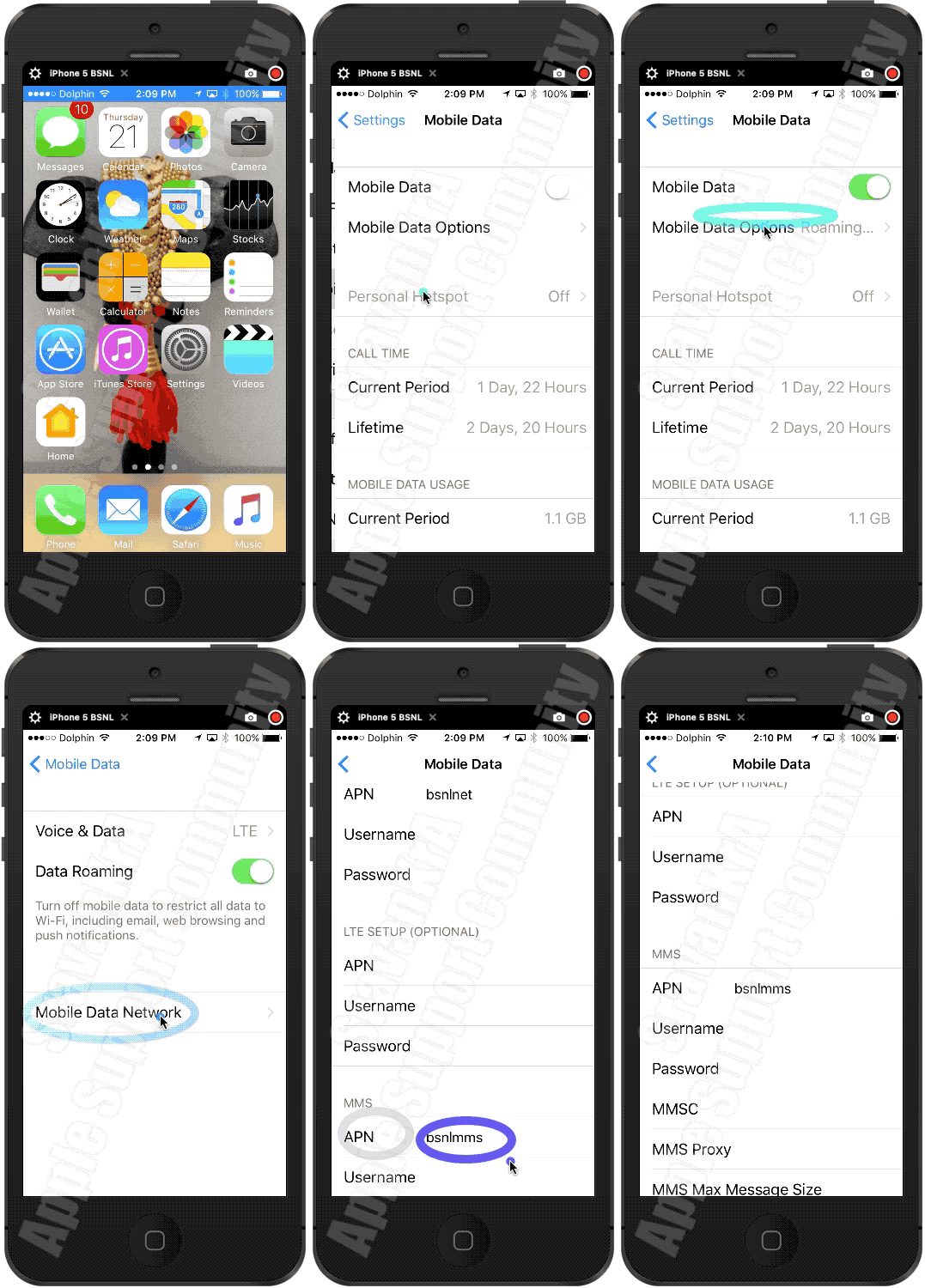

Settings > Mobile Data > APN [under Mobile Data APN] enter the APN pin


View and edit your APN settings

If your carrier allows it, you can view your APN settings in one of the following locations: Settings > Cellular > Cellular Data Options > Cellular Network. Settings> Mobile Data > Mobile Data Options > Mobile Data Network.


View and edit your Access Point Name (APN) on your iPhone ...


Use the APN pin based on your carrier. Ask them (Your Carrrier) or search using any search engine.


Feb 28, 2022 5:51 AM in response to Jnwsmom

Having similar problems with iOS 15.3.1.


After the update every phone call drops shortly after 10 - 20 seconds. I can watch the status beams dropping as soon as the connection is established.


This issue came up with the latest iOS update 15.3.1 and wasn't there before the update.


There were no carrier setting available (German Telekom). But what I found out is that it must have somthing to do with using a physical SIM and an eSIM simultaneously.


When I deactivate the eSIM the phone calls with the physical SIM won't drop. The status beams of the cell network remain at full radio reception. But as soon as I reactivate the eSIM profile, I suffer the issues described above.


Feb 25, 2022 6:30 AM in response to mlorenas

I think I finally fixed mine. I turned off my phone, turned it back on, then reset the network settings several times. It didn’t work the first two or three times, but then suddenly resetting the network settings worked.


They should be telling people that they have to do it multiple times, very frustrating process, and will not be doing any more updates.


Settings > General > Transfer or Reset iPhone > Reset > Reset Network Settings


Good luck.

Feb 26, 2022 11:21 PM in response to mlorenas

Reset all settings. Go to settings, general, transfer or reset iPhone, reset. I reset network settings 2-3 times then I reset all settings. Nothing happened until I connected to wifi, then all of a sudden I started connecting to Verizon. Hope it works for you. I did do this with Verizon on a phone call. I would call my service provider and troubleshoot with them as well.

Mar 9, 2022 9:55 AM in response to Jnwsmom

Same thing happened to me and now I have a nonfunctional phone, so this is a cautionary tale. I tried to update over wifi but it wouldn’t verify. I then backed up and updated over iTunes with no problem. Still no service. Tried everything listed on the Net to fix, short of a factory reset, no success. Spent 3 hours on the phone with Apple Support. They told me to do a factory reset. After that I couldn’t set up the phone. I could get as far as choosing a wifi network and then get a message “Unable to Activate, An update is required to activate your iPhone ”. Apple Support made me an appointment with Apple Genius. They couldn’t fix it either. “So sorry, these things happen sometimes, it’s out of warranty so we can’t do anything for you. We’ll sell you a new one, but, oh, since the phone is now no longer operational in any way, we can’t offer you a trade in on a new phone” . So Apple totally breaks my phone and can offer me nothing at all to recompense me for what they did. I’m posting this to let you know the kind of support you’ll get from Apple. If your phone has no cell service but everything else is fine, DO NOT FACTORY RESET IT, no matter what Apple experts tell you to do. There is another update coming out next week, IOS 15.4, wish I’d known that before I called Apple Support. Maybe downloading that will fix the No Service, who knows? Off to look at Androids.

Feb 21, 2022 4:08 PM in response to Jnwsmom

My calls aren’t connecting when I answer incoming calls! When I answer, the time (the timer that pops up upon a connecting calls) comes on and appears to get stuck at 0:00! It’s as though I’m answering a “dead call” because neither am I hearing the caller, nor am I being heard by them! I also attempted to place outgoing calls which rang incessantly; however, after texting the person I attempted to call, I find out that the phone on the receiving end phone RANG! Is there a solution to this madness??? What’s the issue with 15.3.1?!??

Mar 2, 2022 4:28 PM in response to Jnwsmom

Tried inserting different sim, reset network settings a few times, factory reset phone a couple of times but nothing works. Factory reset made the phone connect to mobile data but when the iCloud data is restored, it’s the same issue. Tried it through iTunes too and it’s the same issue. Apple support through phone or in person apple store visit are unable to give a solution to this either. Apple personnel say maybe there’s a file which might be creating the problem but do not say how to identify that file without loosing the entire backup. It’s strange that issue is only after update to 15.3.1. Hope apple fixes this issue with an update.

Mar 9, 2022 11:07 AM in response to mlorenas

Besides the fact that iTunes is dead on Mac for at least two years now, restoring is no option for me, since banking software then requires new tokens. So any kind of factory reset and restoring is no solution for me.


As a workaround I activated WiFi-call on both profiles. I rarely use the iPhone for phone calls, usually I've been called, but mostly I am then in the office or at my home desk within WiFi-range. So if cell signal drops during a call the Wifi-connection keeps the call alive.


I want Apple to have this issue being fixed! I am tired of hearing something about resetting anything.

This thread has been closed by the system or the community team. You may vote for any posts you find helpful, or search the Community for additional answers.

Cellular service disabled after iOS 15.3.1 update

Welcome to Apple Support Community
A forum where Apple customers help each other with their products. Get started with your Apple Account.
