Apple Home Invites Not Being Received

I just reset our Apple Homepods but when I go to invite the rest of my family they do not receive the invitations? I have updated the software on their phones and everyone is running the latest iOS versions. I have cancelled the invitation and tried reinviting them and still they receive nothing. What can I do to fix this? Why do they not give the option to send invitations by iMessage or email?

Posted on Dec 6, 2022 2:19 PM

Reply
Question marked as Top-ranking reply

Posted on Jan 23, 2023 2:22 AM

Apparently this procedure posted on Reddit solved the problem!!!

Putting it here in case this may be useful for others too.

I did it the RESET only on my wife iPhone (not mine which is the home owner).

Before this, I also "removed" the home app from my wife phone and re-installed it back.

Then applied the profile reset below.

After some minutes of waiting, the invitation was received and she was able to join the home again.


download and launch the HomeKit reset profile Safari on both mobile devices (looks like they change the link periodically, so be advised link may be dated): http://appldnld.apple.com/iOSProfiles/HomeKitReset.mobileconfig (note: you can try first on just the one device and avoid full reset, but I was forced to do both devices)
install the profile on both devices then go to settings to install the profile per these instructions: Install a configuration profile on your iPhone or iPad - Apple Support
restart both devices (may be optional, but doesn’t hurt)
go to settings and scroll down. You should now see a “Home” icon to open then select to “Reset Configuration.” WARNING: this wipes out all your HomeKit accessories and settings. You will need to start over.
open HomeKit app on both devices. They said to leave app open for 10 minutes, but mine reset in a minute. This should force reset your configuration keys.
to test, I added a single HomePod mini to a new Home and then invited spouse. She accepted easy breezy.
It took over a month to get through support to this solution. Hope it saves someone some time and frustration. Good luck!


Credits to:

https://www.reddit.com/r/apple/comments/xwwv3b/apple_homekit_invitations_not_working_solution/


133 replies

Jun 25, 2023 8:17 AM in response to Cascada

What worked for me…


after I reset with the config file from Apple, i was having issues adding Hue lights. Well got that figured out now the invite!!! You have to make an Apple TV 4th gen or later or a home pod your “home hub” to invite people to it. I did that with a quick google search and then added my wife and could invite again. Obviously their security update makes you buy more of their products haha. Hope this helps!!

Feb 15, 2023 10:10 AM in response to Cascada

This problem has been driving me crazy. It seems to be isolated to users that have only previously been invited to your home. If they're removed, they can't be added back. It also appears to be an iOS16/MacOS Ventura issue. One of my wifes devices was on MacOS Monterey and it was recieving the invite. I accepted the invite, was able to see everything as normal, but the home wasn't showing up on your other devices that were on iOS16/Ventura. After I upgraded to her laptop to Ventura, the home disappeared. Hopefully Apple fixes this soon.

Feb 13, 2023 6:09 AM in response to Rabgye

All our IT consumer products are from Apple where possible (iPhones, iPads, appleTVs, Airpods, ...), so using HomeKit was my default choice for "ultra" integration. But boy oh boy what a disappointment!


I posted here some time ago that I was fed up with all the bugs in Homekit and was going to build the frontent myself in Node-Red. This was when I was trying to resolve other HomeKit issues by removing the Homekit config and reconfigured everything on a new appleTV 4K with Ethernet. But, as everybody here already knows, it is not possible anymore to invite guests. So my wife was locked out and she had to call me to open the gate as we use HomeKit to trigger a switch to open our gate.


All "solutions" provided did not work. Only to let frustration grow.


What apple tends to forget is that HomeKit is kind of a mission critical application regarding a home. Switches for my heating, my gate, and other important stuff was managed thru Homekit.


As the issue was urgent I worked thru the weekend to create a dashboard using Node-Red. A lot of work but I really like the end result. The iPad in my living room now looks like this:
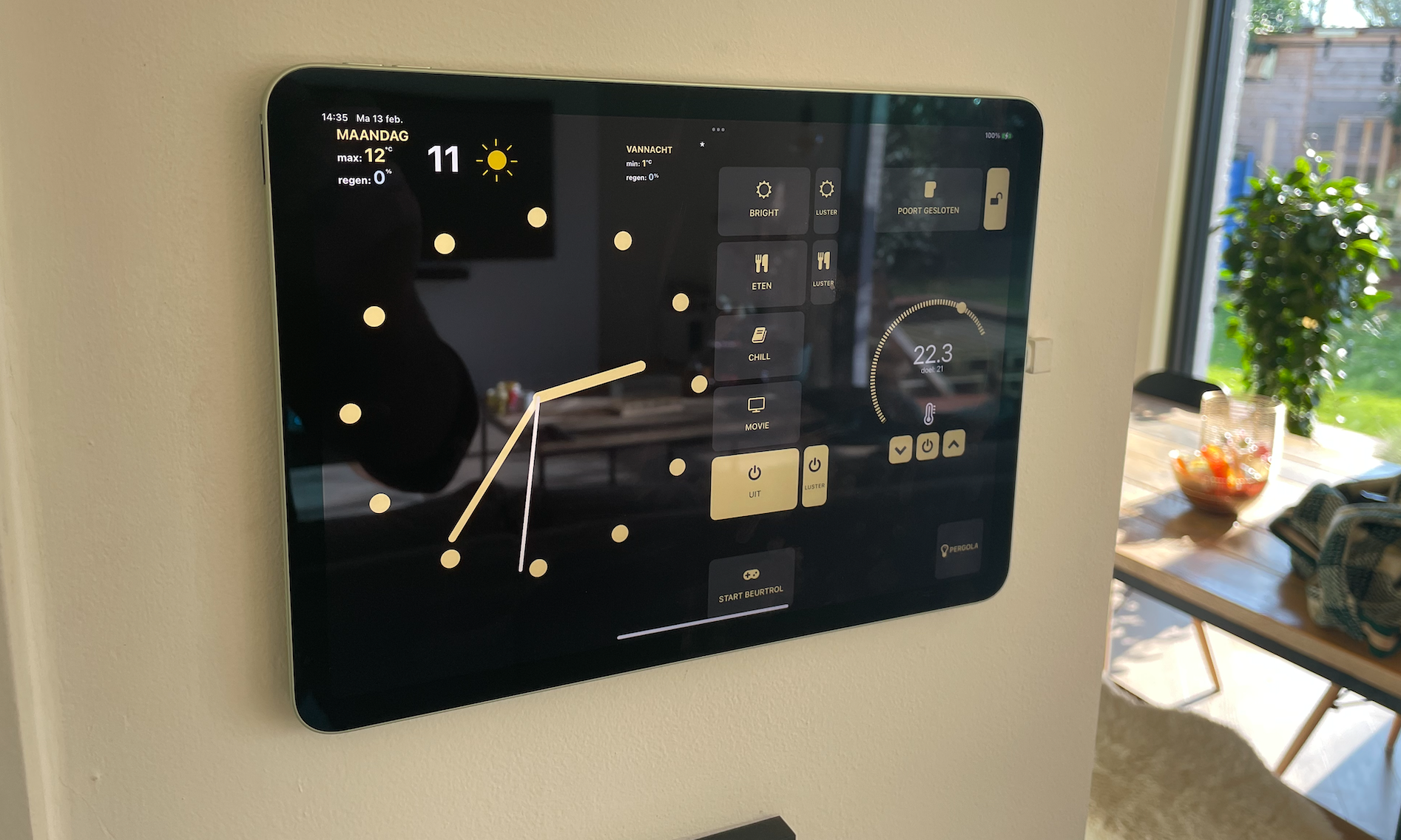

When somebody rings at the gate, a picture pops-up for 2 minutes: a ton of features not possible with Homekit.

But most important: finally a stable solution! No delays, no connection issues (what a relief).


I also created a dashboard for our iPhones

I use the RemoteRED application: that application broadcasts the Node-Red dashboard webpage thru a secure tunnel to an iPhone app. So basically, my Node-Red webpage becomes an app:
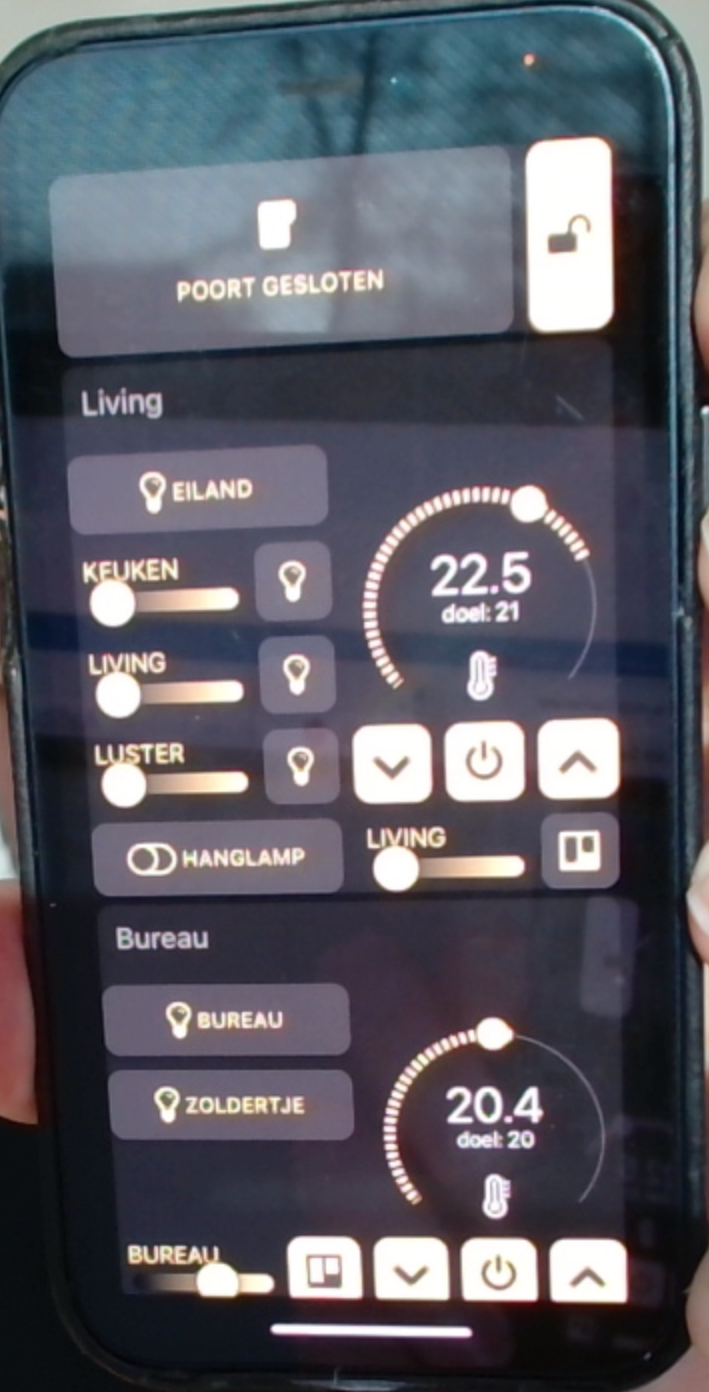


Automatically opening our gate is now done thru Shortcuts, where the RemoteRED application is used to send a command to Node-Red:
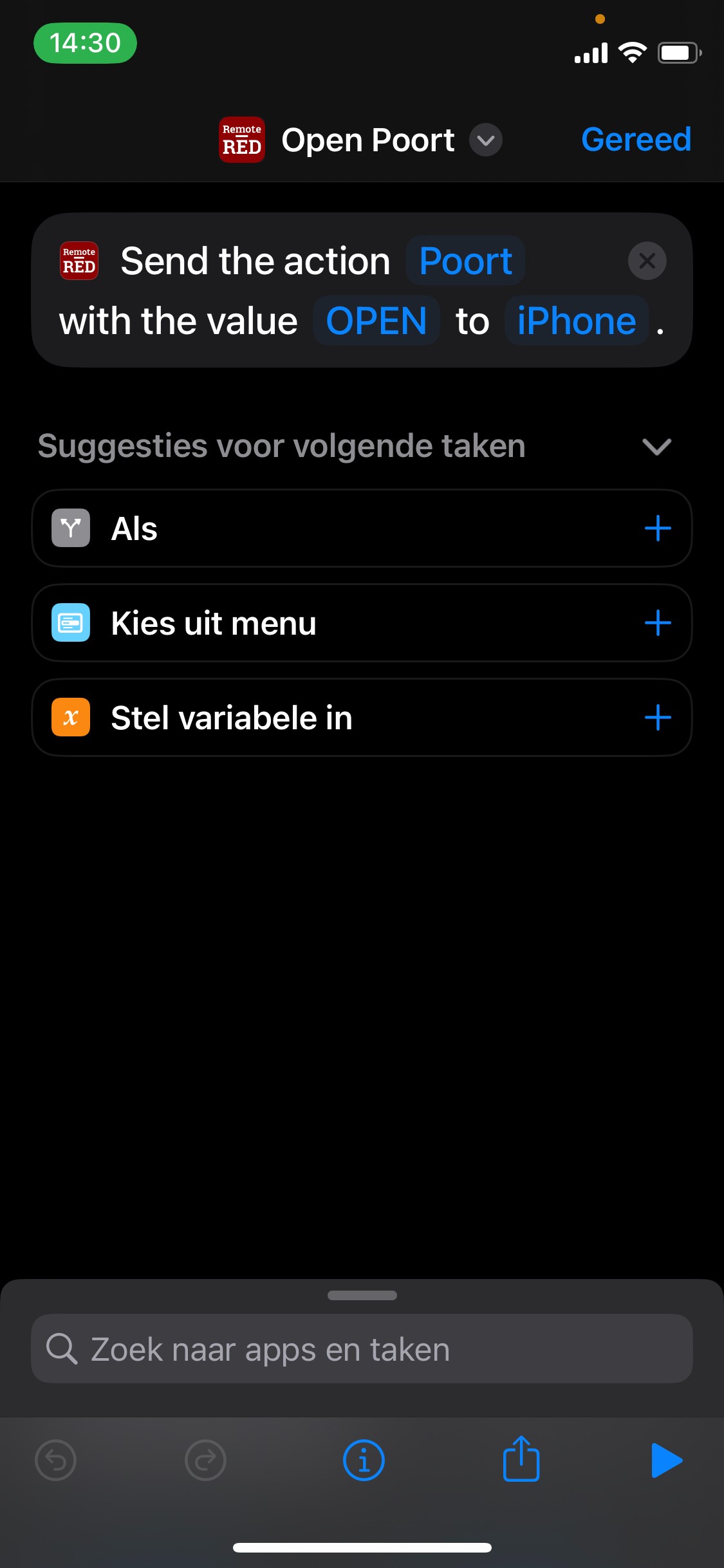

The result is full control of my home and automations without any HomeKit.


My main message is: when you rely on an application or framework that does not work, even if it is from a giant like Apple. Just search for alternatives that do work :-)

Jan 22, 2023 11:20 AM in response to marco202

Same here.

I reconfigured a new home after using an iPad Pro became so slow that it was unbearable to work with (15s to turn on/off a light).


now this problem, seems as if the HomeKit app is just full with bugs.

When I invite my wife, it states “pending invitation” but no invitation is received. I reinstalled the apps, restarted all possible hubs, etc… but nothing works.

Feb 10, 2023 12:23 PM in response to Cascada

My girlfriend has an iPhone 12 mini with newest iOS 16.3 version and a little older MacBook Pro 2015 with macOS 12.6.3 (the newest version of macOS is 13.1, but her device does not support it).


When I'm sending invitation to her, she receives it on the macOS. She see invitation and is able to join home on macOS, but home is not visible on iOS. More: she joins home on macOS and is able to control home, but iOS still see noting.


It seems like a migration or version compatible issue for me...

Feb 11, 2023 2:58 PM in response to MBK45

Set up your HomePod, HomePod mini, Apple TV, or iPad as a home hub - Apple Support (CA)

According to the Apple Support..you need a 4K AppleTV.. I had a 3rd Generation HD AppleTV so I thought ...

"You must set up a home hub to add Matter accessories to the Home app.

Thread-enabled Matter accessories require a Thread-enabled home hub,

such as HomePod mini or Apple TV 4K (3rd generation) Wi-Fi + Ethernet,

or a supported third-party border router."


.. and so with my stupid desperation, I went and got myself the Latest AppleTV /4K 128Gb WiFi + Ethernet ...!

The end result is STILL THE SAME problem ! No Go ! My shared users still not receiving any of my INVITATIONS, after sending several the Home App Invitations ! This is getting ridiculous ...


C'mon Apple Support !!! you need to acknowledge the problem or tell us whether the problem is in your HomeApp software or your iCloud Servers !? so we don't have to keep banging our heads, trying to figure out to resolve this Home App's Invitation Issues ! Give us the Fix , man !

Feb 12, 2023 8:06 AM in response to MBK45

Hi same to me 😂 everything has been updated: my iPhone iOS, my Mac Ventura, my HomePod mini to the new Home architecture… it has even get some another update to 16.3.1! Still my Home app on my Mac didn't receive any invitation from iOS… what's going on with these all dozens of invitations I've been already sent? Is there any HomeKit system logs where I can find out what's wrong? All I can see is these pending invitations just hanging there in iOS Home app

This thread has been closed by the system or the community team. You may vote for any posts you find helpful, or search the Community for additional answers.

Apple Home Invites Not Being Received

Welcome to Apple Support Community
A forum where Apple customers help each other with their products. Get started with your Apple Account.