Beats Studio pro 2023 static noice in left ear (with anc)

Hello, about a month after buying the headphones, static noise started in the left earphone when the noise cancelling was turned on. When I turn off the noise - the sound disappears.


Please tell me what can be done? This static noise very annoying to me…


Posted on Oct 1, 2023 5:49 AM

Reply
Question marked as Top-ranking reply

Posted on Oct 3, 2023 7:09 AM

Hello Avt0bus,


Thank you for reaching out to Apple Support Communities, and we'll be happy to help in any way we can. We understand you're having issues with static noise in your left Beats Studio Pro. Try resetting them as described here to see if that resolves the issue: Reset your Beats on-ear or over-ear headphones - Apple Support


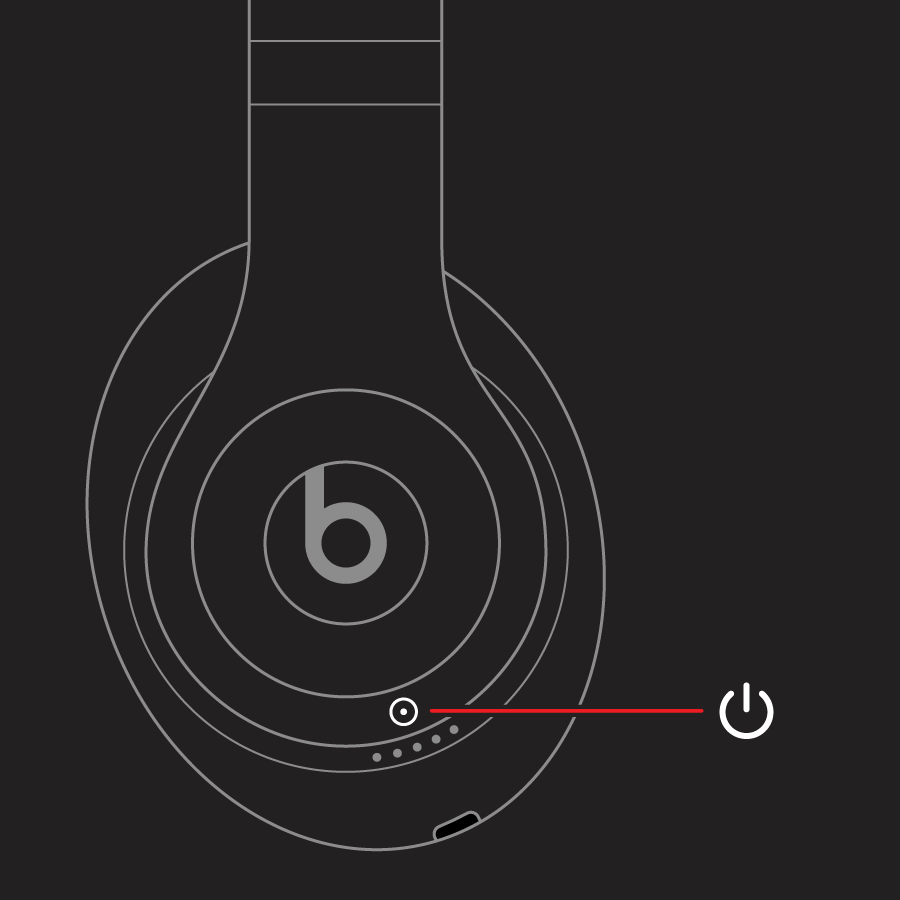
"Reset Beats Studio Pro, Studio, or Studio Wireless

  1. Press and hold the power button for 10 seconds.
  2. Release the power button.
  3. All of the Fuel Gauge LEDs blink white, then one LED blinks red. This sequence happens three times. When the lights stop flashing, your headphones are reset.

Your Studios will automatically power on after a successful reset."


We hope this helps.


Cheers!


88 replies
Question marked as Top-ranking reply

Oct 3, 2023 7:09 AM in response to Avt0bus

Hello Avt0bus,


Thank you for reaching out to Apple Support Communities, and we'll be happy to help in any way we can. We understand you're having issues with static noise in your left Beats Studio Pro. Try resetting them as described here to see if that resolves the issue: Reset your Beats on-ear or over-ear headphones - Apple Support


"Reset Beats Studio Pro, Studio, or Studio Wireless

  1. Press and hold the power button for 10 seconds.
  2. Release the power button.
  3. All of the Fuel Gauge LEDs blink white, then one LED blinks red. This sequence happens three times. When the lights stop flashing, your headphones are reset.

Your Studios will automatically power on after a successful reset."


We hope this helps.


Cheers!


Feb 1, 2024 8:30 PM in response to egeek84

Update: Drove an hour to my closest Apple Store, and since they don’t do in-house diagnostics on Beats, they were shipped out to be looked at. Was told 5-7 days to complete the process to assess repair or replacement. Associate confirmed this is a very common issue for this model…


I asked what happens if the presumed replacement is defective again, and the associate said you only get a 90-day warranty (this does not get added to the original warranty period) and you cannot purchase Apple Care to extend the warranty further.

Apr 17, 2024 4:50 AM in response to peaceola

Mine was replaced after sending it twice. The first time they said they couldn’t reproduce the problem 😒. Then I called them using it and apparently the person in the other side of the call can also feel it, so I asked them to write a note and went back to Best Buy to send it again. They changed it this time. Super annoying because was like two weeks without it just because the technician couldn’t find the problem the first time, apparently didn’t even use them because it was painful at this point.

Jun 15, 2025 8:03 AM in response to Avt0bus

I have the Beats Studio Pro purchased in 2024 with the same problem. I turned off Personalized Spatial Audio. That removed the low level hissing sound in both ears when noise cancellation turned on, and a roaring hissing sound in my left year that developed after about 10 to 15 minutes of noise cancellation use. Time will tell if the roaring hissing sound returns.

Oct 3, 2023 10:47 AM in response to Avt0bus

Greetings Avt0bus,


We're glad you tried resetting the Beats, as normally that is a pretty solid step to correct most issues. Make sure you have tried all the recommended settings as advised on this page:


It offers guidance for various audio issues and how to correct them. If the issue remains after these steps, you may want to reach out to Apple Support directly. You can reach out to them by clicking here: Get Support or over the phone by calling the number that is most local to your region: Contact Apple for support and service - Apple Support.


Kind regards!

Nov 22, 2024 9:54 PM in response to Avt0bus

I don’t know if anyone is still having this problem but I was having the same problem with the noise cancellation feature straight out of the package. I was like this can’t be right these are brand new. These are the first pair of beats earbuds I ever owned so I did all the troubleshooting tips to try and fix the problem to no avail. I was like let me google and see if I put them in my ear correctly and come to find out the wasn’t in correctly such a foolish thing on my part but I saw how they was supposed be inserted in your and once I corrected the static in the left ear stopped. I no longer hear static maybe it will help everyone else like it helped me.

Mar 14, 2024 7:53 AM in response to Avt0bus

Yesterday I've got my second replacement pair (so it's the third one in a row since Oct 2023) and you know what? just started to hear little random clicks on the left earbud... that's how it starts. First had issues with the right one, second with the left, and now left again.


My plan for now is to replace them as many time as I will have to, until I finally get a working pair, since I can't change the model or get money back. Am I limited by a calendar year of warranty since I bought them? We'll see.


Really annoyed about wasting so much time for this.

This thread has been closed by the system or the community team. You may vote for any posts you find helpful, or search the Community for additional answers.

Beats Studio pro 2023 static noice in left ear (with anc)

Welcome to Apple Support Community
A forum where Apple customers help each other with their products. Get started with your Apple Account.