Friends here is the answer for your question.
 iPhone X ring volume very low and how to fix?
Have you noticed the iPhone X ringer volume goes from loud to low? Often iPhone X users notice that the iPhone X ringtone will sound very quiet after initially sounding loud, but despite pressing the volume up buttons they can’t get the iPhone X ringtone to sound loud again, it’s just stuck quiet. Don’t fret and there’s nothing wrong with your iPhone X for exhibiting this behavior, in fact this is actually a feature.
If your iPhone X rings loud but then gets quiet and stays quiet, but you’d rather have the iPhone X ringer volume stay loud all the time when getting a call, read on to learn the proper settings adjustment to stop this behavior. The end result will be that iPhone X sounds loud on incoming calls all the time and the iPhone X will stop quieting the ringtone volume itself.
What causes the iPhone X ringtone volume to be very low after initially sounding loud? It’s actually a Face ID feature. And yes, this ring sound volume lowering capability applies even if Face ID is not being used on iPhone X to unlock or authenticate the device, and much like how Animoji uses the Face ID camera to scan your face even if you aren’t using Face ID authentication, the front camera for face scanning is active for other features too, and that includes the ringtone volume.
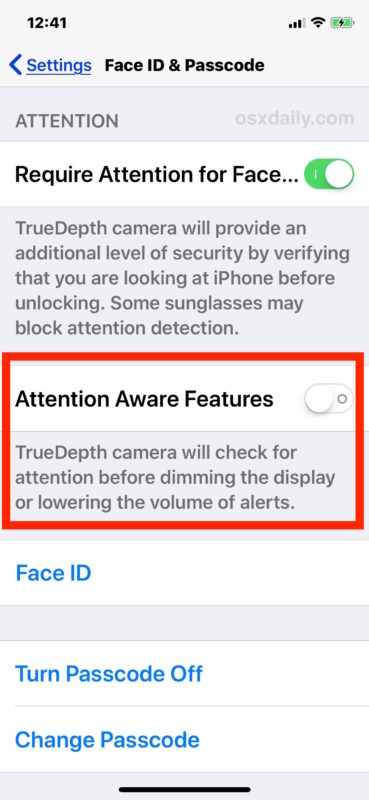
You can disable the attention awareness feature that scans your face and determines you’re looking at the iPhone X, which in turn lowers the ring volume on the device. With this feature turned off, the iPhone X will stop lowering the ring volume of calls automatically when you pick up the iPhone and look at it.
- Open the “Settings” app on the iPhone
- Go to the “Face ID & Passcode” section
- Locate the “Attention Aware Features” option and turn the switch to the OFF position
- Exit out of Settings
iPhone X ring volume very low and how to fix
Have you noticed the iPhone X ringer volume goes from loud to low? Often iPhone X users notice that the iPhone X ringtone will sound very quiet after initially sounding loud, but despite pressing the volume up buttons they can’t get the iPhone X ringtone to sound loud again, it’s just stuck quiet. Don’t fret and there’s nothing wrong with your iPhone X for exhibiting this behavior, in fact this is actually a feature.
If your iPhone X rings loud but then gets quiet and stays quiet, but you’d rather have the iPhone X ringer volume stay loud all the time when getting a call, read on to learn the proper settings adjustment to stop this behavior. The end result will be that iPhone X sounds loud on incoming calls all the time and the iPhone X will stop quieting the ringtone volume itself.
What causes the iPhone X ringtone volume to be very low after initially sounding loud? It’s actually a Face ID feature. And yes, this ring sound volume lowering capability applies even if Face ID is not being used on iPhone X to unlock or authenticate the device, and much like how Animoji uses the Face ID camera to scan your face even if you aren’t using Face ID authentication, the front camera for face scanning is active for other features too, and that includes the ringtone volume.
You can disable the attention awareness feature that scans your face and determines you’re looking at the iPhone X, which in turn lowers the ring volume on the device. With this feature turned off, the iPhone X will stop lowering the ring volume of calls automatically when you pick up the iPhone and look at it.
- Open the “Settings” app on the iPhone
- Go to the “Face ID & Passcode” section
- Locate the “Attention Aware Features” option and turn the switch to the OFF position
- Exit out of Settings
You can confirm this works by getting an incoming call on iPhone X, it should now be loud as your settings were set to beforehand and no longer quiet the call to a very low volume automatically.
Another helpful step is to make sure your iPhone ringer volume is turned up all the way to the loudest setting, since sometimes users have inadvertently made the iPhone volume low
You can confirm this works by getting an incoming call on iPhone X, it should now be loud as your settings were set to beforehand and no longer quiet the call to a very low volume automatically.
Another helpful step is to make sure your iPhone ringer volume is turned up all the way to the loudest setting, since sometimes users have inadvertently made the iPhone volume low
iPhone X Ring Volume Low For Incoming Call? Here is Why
